Audio flashcard apps for iPhone, compared
Several apps let you review flashcards by ear. Colloquial is the one that rings you when it’s time, so you never have to remember to start. Here’s how a practice call works, and how it compares.
Colloquial is a free audio flashcard app for iPhone that starts your review for you. At a time you choose, your phone rings like a real incoming call, and when you answer it plays each question out loud, waits for you to say the answer, plays the correct answer, and listens for you to say “got it” or “needs work”. The whole session can happen with the phone locked and the screen off.
There are several good audio flashcard apps on the App Store now, and most of them are built for the same moments: walking, commuting, the gym, the washing up. I built Colloquial because the hard part for me was never listening to the cards, it was remembering to open the app at all, and a phone call is the one thing on a phone I don't ignore. This page walks through how a practice call works, with screenshots from the iPhone app, and then compares Colloquial honestly with the other audio flashcard apps, including the cases where one of them is the better choice.
How a practice call works, step by step
1. Add a deck
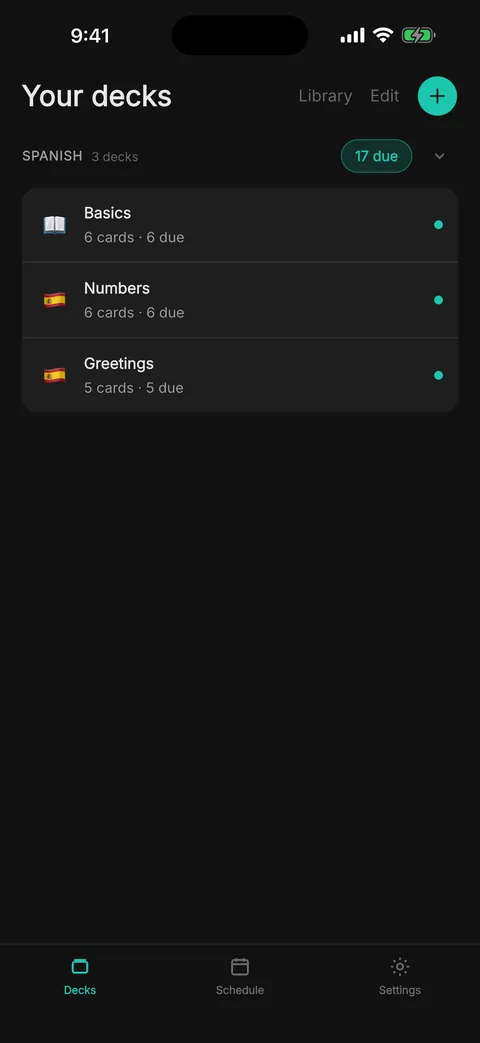
A deck is a list of cards, and every card is a pair of audio clips: a question and an answer. You can add a ready-made deck from the Library (the entry at the top of the Decks screen), make your own, or import one. Import takes a CSV or text file, pasted text, or a deck exported from Anki as text, and the phone's own voice reads out any card that arrives without audio. Decks are grouped by the pack they belong to, and each one shows how many of its cards are due.
2. Record your own cards
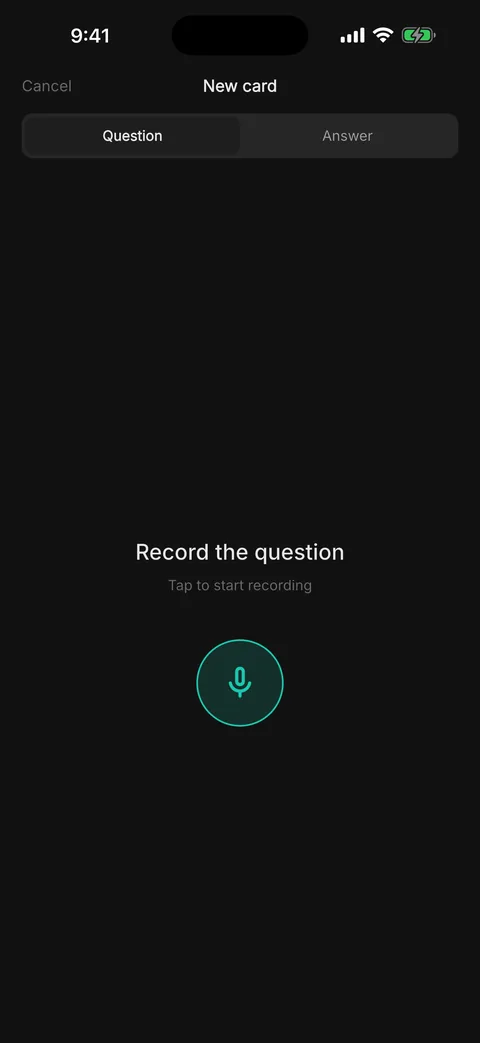
To make a card, tap the plus button inside a deck, record the question, then switch to the Answer tab and record the answer. Each recording takes a few seconds, and you can add a text label to either side so the card is easy to find in the list later. Your recordings are yours: they're never sold or used for training, and they're deleted with your account.
3. Practise now, or schedule a call
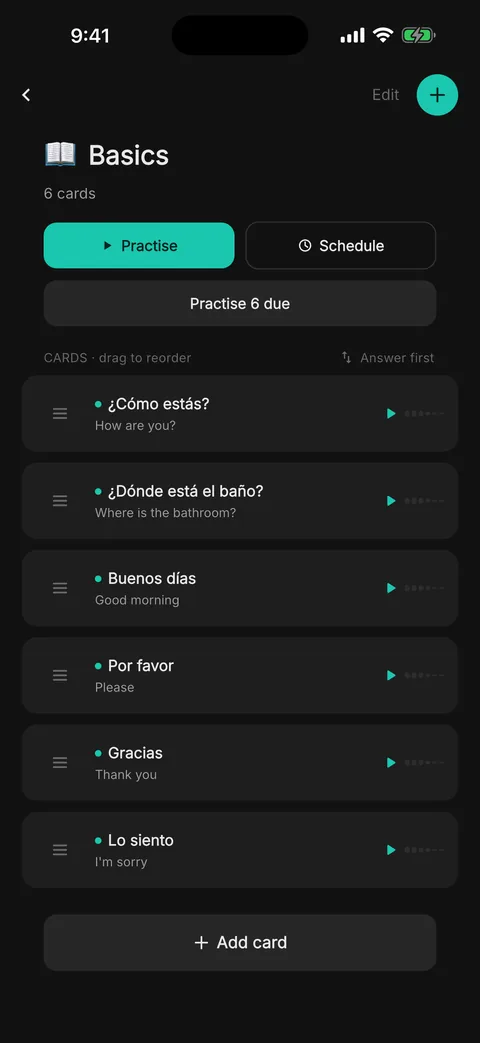
Open a deck to see its cards, play any of them, and drag them into the order you want. From here you can practise straight away, or tap Schedule to have the deck call you later. The Answer first switch flips the deck, so you hear the answer and have to recall the question, which is useful for vocabulary you want to produce as well as recognise.
4. Pick when it rings
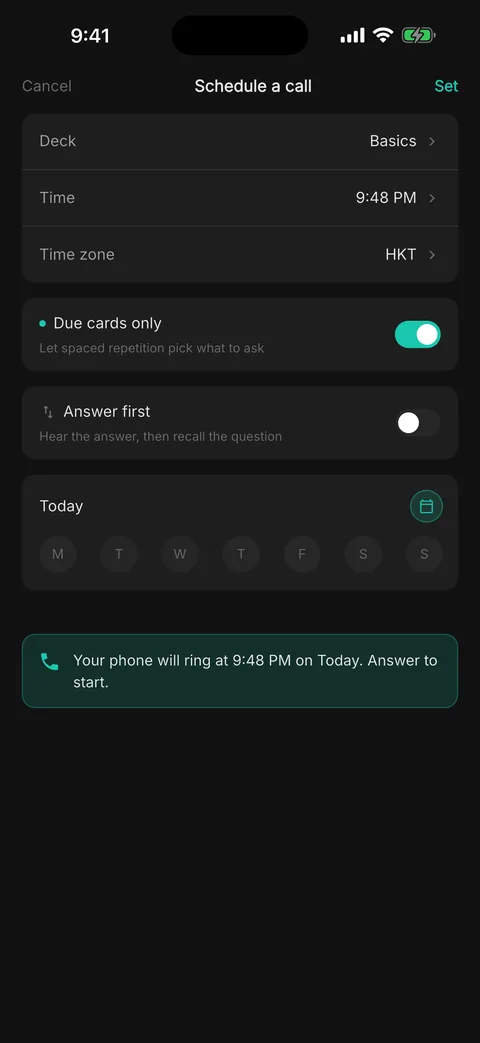
The schedule sheet asks for a deck, a time and a time zone, and you can repeat the call on any days of the week. With Due cards only switched on, spaced repetition decides which cards each call asks, so you hear the cards you're about to forget and not the ones you know cold. The confirmation at the bottom tells you exactly when your phone will ring.
5. Answer the call
At the time you picked, your iPhone rings with the same call screen as any other call, even when it's locked, and the caller name is the deck or pack being practised. You answer it with the normal Accept button. If you decline or miss it, Colloquial doesn't ring you again: the call is marked missed and the cards stay due for next time, or you can practise them from the app whenever you like.
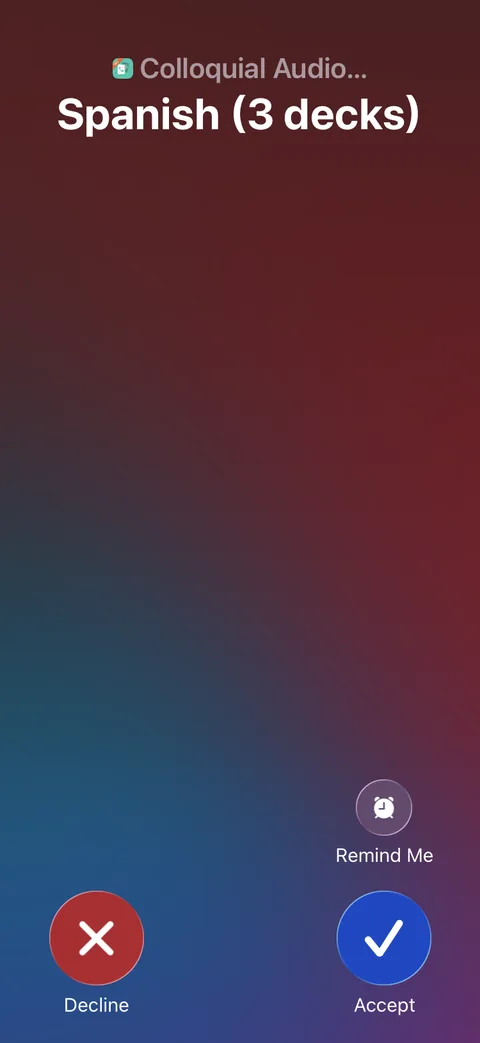
6. Say the answer, then rate it out loud
Once you've answered, the call plays the first question and goes quiet while you say the answer out loud. The pause adapts to the card: a longer answer gets more time, and a card you've known for weeks gets less. Then the call plays the correct answer so you can hear how close you came, and you say “got it” or “needs work” to move on. Recognising those two phrases happens on the phone itself, and nothing you say is sent anywhere. If your phone can't recognise speech on the device for your language, the two buttons do the same job.
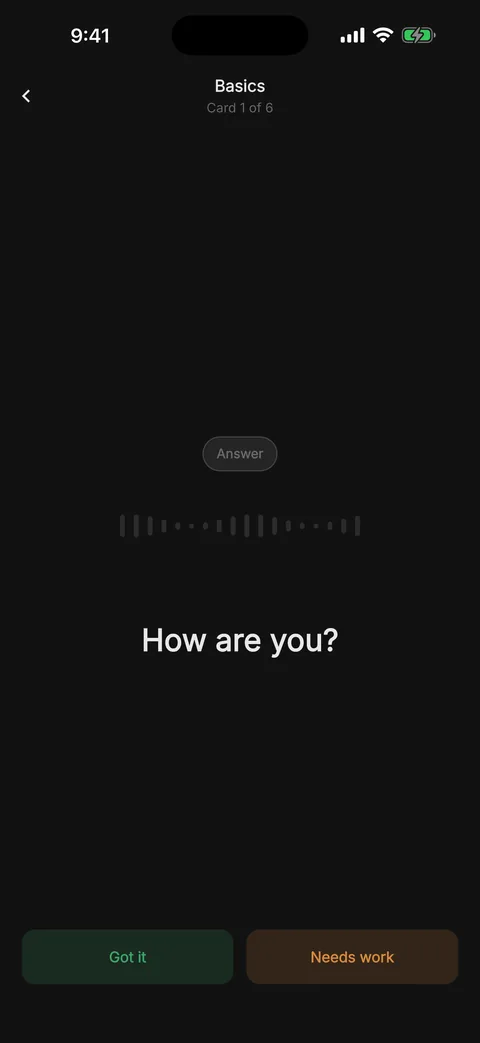
When the deck is done the call ends, and spaced repetition (the SM-2 algorithm, run on Colloquial's server) works out when each card should come back. A card you got comes back after a longer gap each time, and one that needs work comes back soon.
How Colloquial compares with other audio flashcard apps
These are the apps that come up when you search the App Store for audio flashcards. The table is based on each app's own App Store listing, read on 16 October 2026. “Not listed” means the listing doesn't mention the feature, which isn't the same as the app lacking it, so check the listing if a row matters to you.
| Rings you at a set time | Answer out loud and get checked | Voice controls | Text-to-speech | Import | Works offline, no account | |
|---|---|---|---|---|---|---|
| Colloquial | Yes, as a real call | You hear the answer and judge it | “Got it” / “needs work”, on the device | Yes, the phone's voice, for imported cards | CSV, text, paste, Anki text export | No, needs an account |
| Audio Flashcards App | Not listed | Not listed | Not listed | Yes | Not listed | Not listed |
| AudioStudy | Not listed | Not listed | Not listed | Yes, iOS voices | CSV | Not listed |
| MemTalk | Not listed | Yes, checked automatically | Yes | Yes | Not listed | Not listed |
| Audio Cards | Not listed | Not listed | Yes, a full set | Yes | CSV and Anki .apkg | Yes |
What makes Colloquial different
Of the apps above, Colloquial is the only one whose listing says it starts the session for you. Every other app waits for you to open it, which is fine on the days you remember, and the days you don't are the ones that decide whether spaced repetition works. Because Colloquial uses the phone's real call screen, it reaches you the way a call does: on the lock screen, over whatever else you're doing, with a ring you've spent your whole life learning to answer. I wrote more about that choice in why a call and not a notification.
The rest of the design follows from the phone being at your ear. The session never asks you to look at the screen, rating happens by voice so the phone can stay locked, the call starts on the earpiece like any other call (with a speaker button, and headphones work too), and there are no streaks, points or badges, because a call that guilt-trips you is a call you stop answering.
When another app is the better choice
If you want to study fully offline with no account, Audio Cards says that's how it works, and it also imports Anki decks directly. If you want the app to mark your spoken answer for you rather than judging it yourself, MemTalk's listing says it does that. If you'd rather type cards one at a time in the app and have them read aloud, Audio Flashcards App, AudioStudy and MemTalk all do that, while Colloquial gives a voice only to cards you import and asks you to record cards you make in the app. And if most of what you study is text, images or cloze cards, Anki is still the tool to beat, with AnkiMobile as its iPhone app.
Colloquial is the one to pick if the reason you fall behind is that you forget to start, or if you want your reviews to fit into time when you can't look at a screen at all.
Questions people ask
Which flashcard app calls you on the phone?
Colloquial. You schedule a time, and your iPhone rings with a normal incoming call that walks you through your due cards out loud.
Does it work when my iPhone is locked?
Yes. The call uses Apple's own call screen, so it rings on the lock screen, and the whole session can run with the phone still locked because you rate each card by voice.
What happens if I miss the call?
Nothing bad. Colloquial doesn't ring again, the cards stay due, and you can practise them from the deck at any time or wait for the next scheduled call.
Is my voice sent anywhere?
What you say during a call is recognised on the phone and never leaves it. Cards you record yourself are stored in your account so they can play during calls, they're never sold or used for training, and deleting your account deletes them.
Is Colloquial only for learning languages?
No. Language learning is what most people use it for, but any card with a question and a spoken answer works, such as medical or legal terms, lines for a role, or a passage you want to know by heart.
How much does it cost, and what do I need?
Colloquial is free with no ads. It needs iOS 15 or newer and is on the App Store in 42 countries. The one limit is on how many cards you keep at once, which is enough for several full decks. The Android version follows soon.
Get Colloquial on the App Store
Colloquial is a flashcard app that calls you and walks you through your deck out loud.
See how it works →